
-
Unturned Hacks — Undetected Aimbot, ESP & Wallhack for Every Map
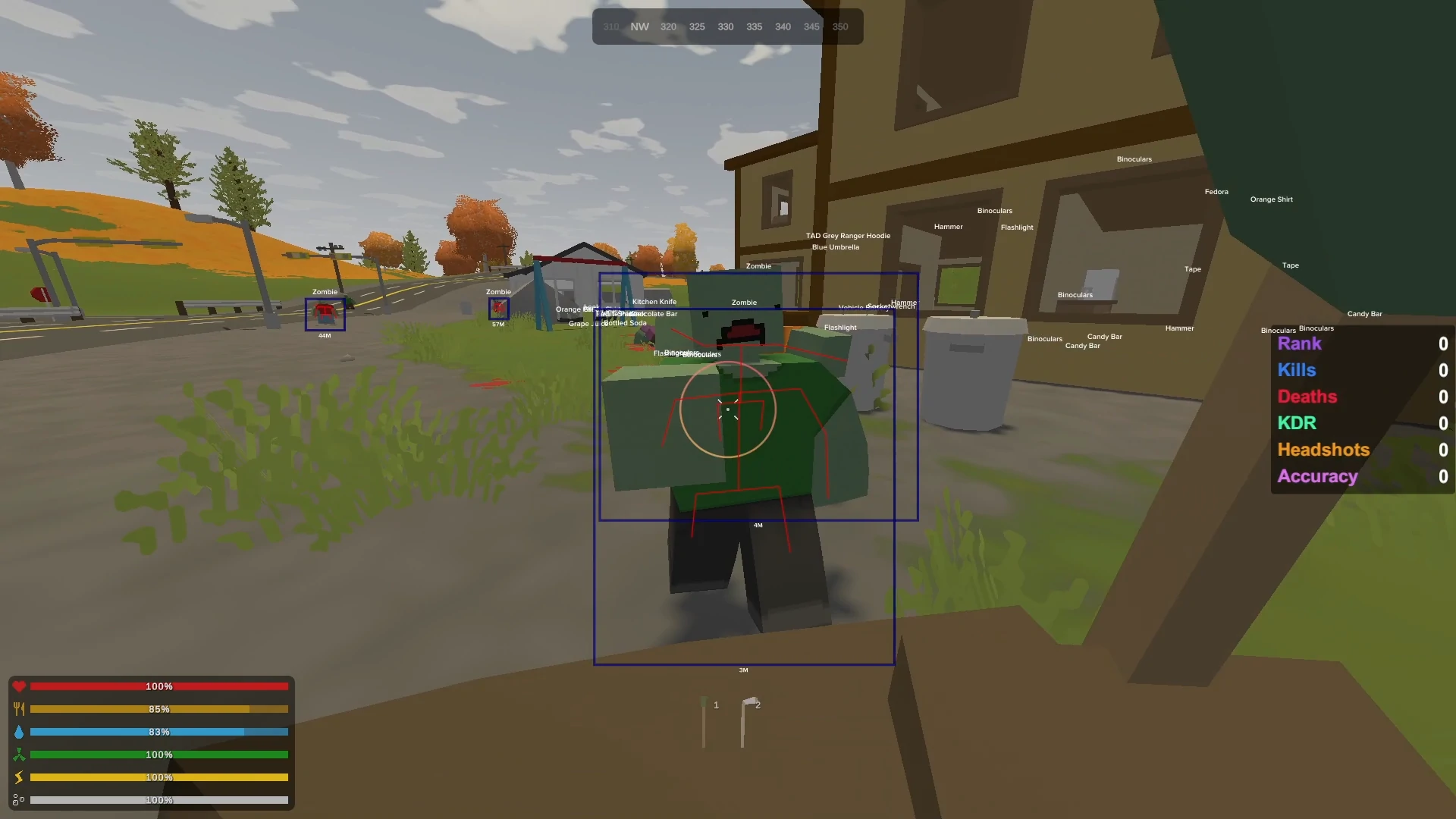
Unturned hacks from BurgerCheats include aimbot with bone selection for Mega Zombie headshots, full ESP overlay separating Military-tier Maplestrikes from Civilian junk across PEI, Washington, and Russia, wallhack for reading Brick base layouts before placing a single charge — all bypassing BattlEye's kernel-level driver with HWID spoofer protection against the latest hardware ban detection.
-
Featured Products
-
-
BattlEye runs a kernel driver every time Unturned loads on a secured server, and a BattlEye HWID ban doesn't just lock you out of Unturned — it follows your hardware fingerprint to DayZ, Tarkov, Rainbow Six Siege, and every other BattlEye title. Every section below covers configurations tested against the current BattlEye build, with specific settings for Unturned's maps, weapons, and zombie types.
Unturned Aimbot — Landing Timberwolf Shots Through Zombie Hordes
Unturned aimbot auto-locks onto players and zombies with adjustable FOV, smooth aiming, and bone selection across every official and curated map. The aim bone selector targets heads for one-tap Timberwolf kills or center mass for Maplestrike spray control, while BattlEye bypass keeps aim velocity curves within human-like patterns to avoid kernel-level detection flags.
Every Unturned PvP server has the same player — full military gear, Grizzly with an 8x scope, sitting on the hill above Charlottetown picking off freshies who just spawned on the beach with a flashlight and a can of beans. The community calls it KOS, and it's been the default social contract since the game launched. The player doing the sniping doesn't need better aim — they need to never miss the one shot that matters when a geared squad rolls up to contest their hilltop.
Unturned Aimbot Settings — Bone Selection and FOV for PvP and PvE
Unturned aimbot settings let you toggle aim bone targets, adjust FOV width, and set smooth aim speed to match the engagement type. A Mega Zombie at the Holman Isle military base on PEI has north of 2,500 health on normal difficulty — that's roughly 66 Maplestrike headshots or 12 clean Timberwolf headshots with bone lock set to skull. Wide FOV (120°) covers the Mega's aggro range in deadzone corridors where Sprinters and Flankers flank from side passages. Tight FOV (30–45°) suits Maplestrike duels in Washington's urban buildings where precision matters more than coverage.
The Grizzly's semi-automatic fire rate gives it an edge over the bolt-action Timberwolf when bone lock handles the aim — 12 headshots land in half the time because you're not cycling the bolt between each round. That ammo economy matters when you're burning through Ranger magazines deep inside the Russia deadzone with no resupply nearby.
Smooth Aim vs Silent Aim
Smooth aim drags your crosshair toward the target at a configurable speed, mimicking human mouse movement with natural acceleration curves. Silent aim corrects bullet trajectory server-side without moving your crosshair at all — your screen shows you shooting left while the bullet registers a headshot. BattlEye's behavioral heuristics flag instant snaps, so smooth aim at 60–80% speed looks indistinguishable from a player with good tracking. Silent aim is harder to detect visually but leaves server-side inconsistencies between crosshair position and hit registration that BattlEye's newer analysis modules can flag.
On servers running DayZ's BattlEye survival servers with similar kernel protection, the same logic applies — smooth aim survives longer than silent aim under active scrutiny. Unturned's Unity engine sends hit data slightly differently than Unreal Engine titles, but BattlEye's velocity curve analysis works identically across both.

Unturned ESP — Every Alice Pack, Maplestrike, and Player on the Server
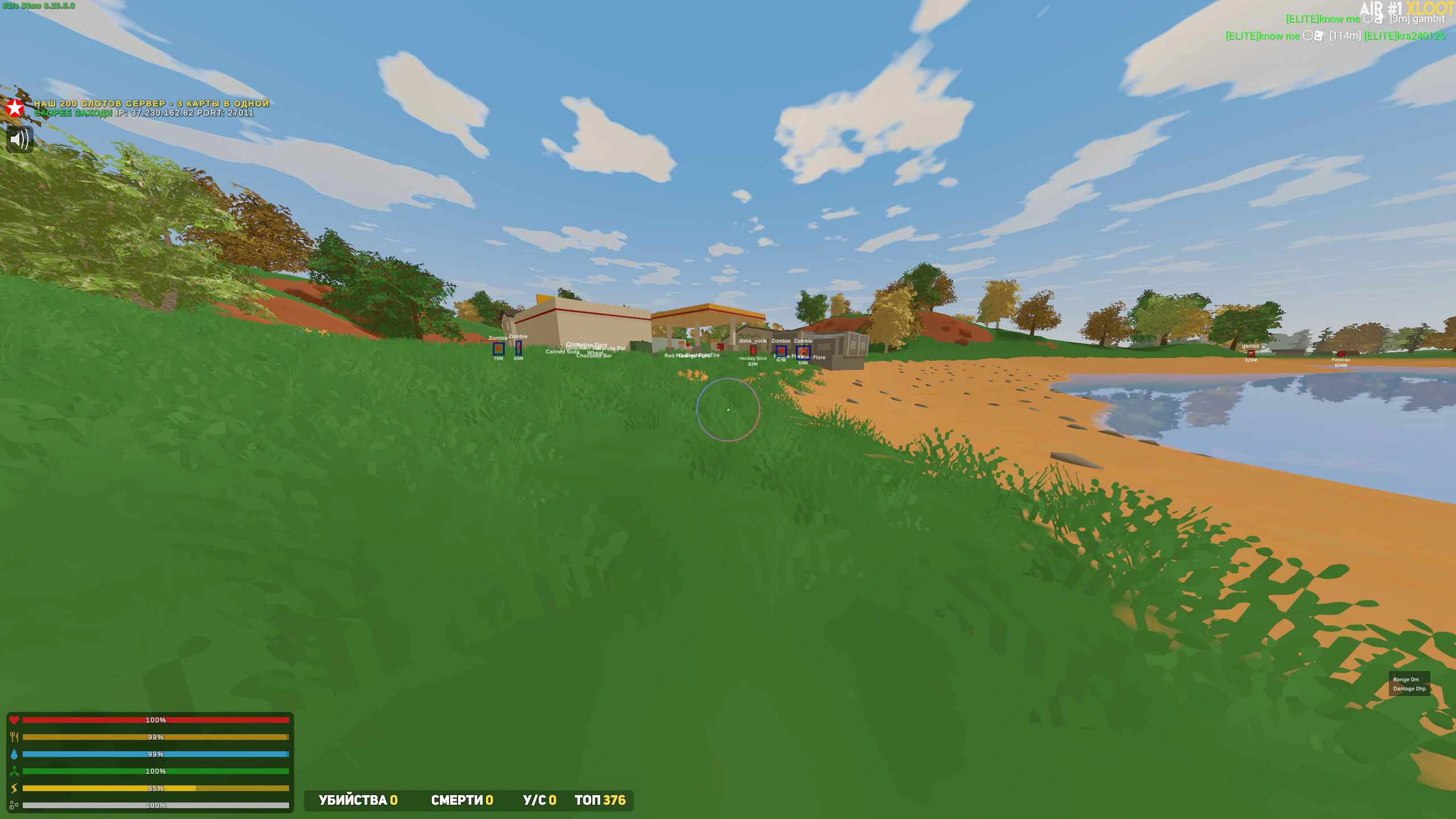
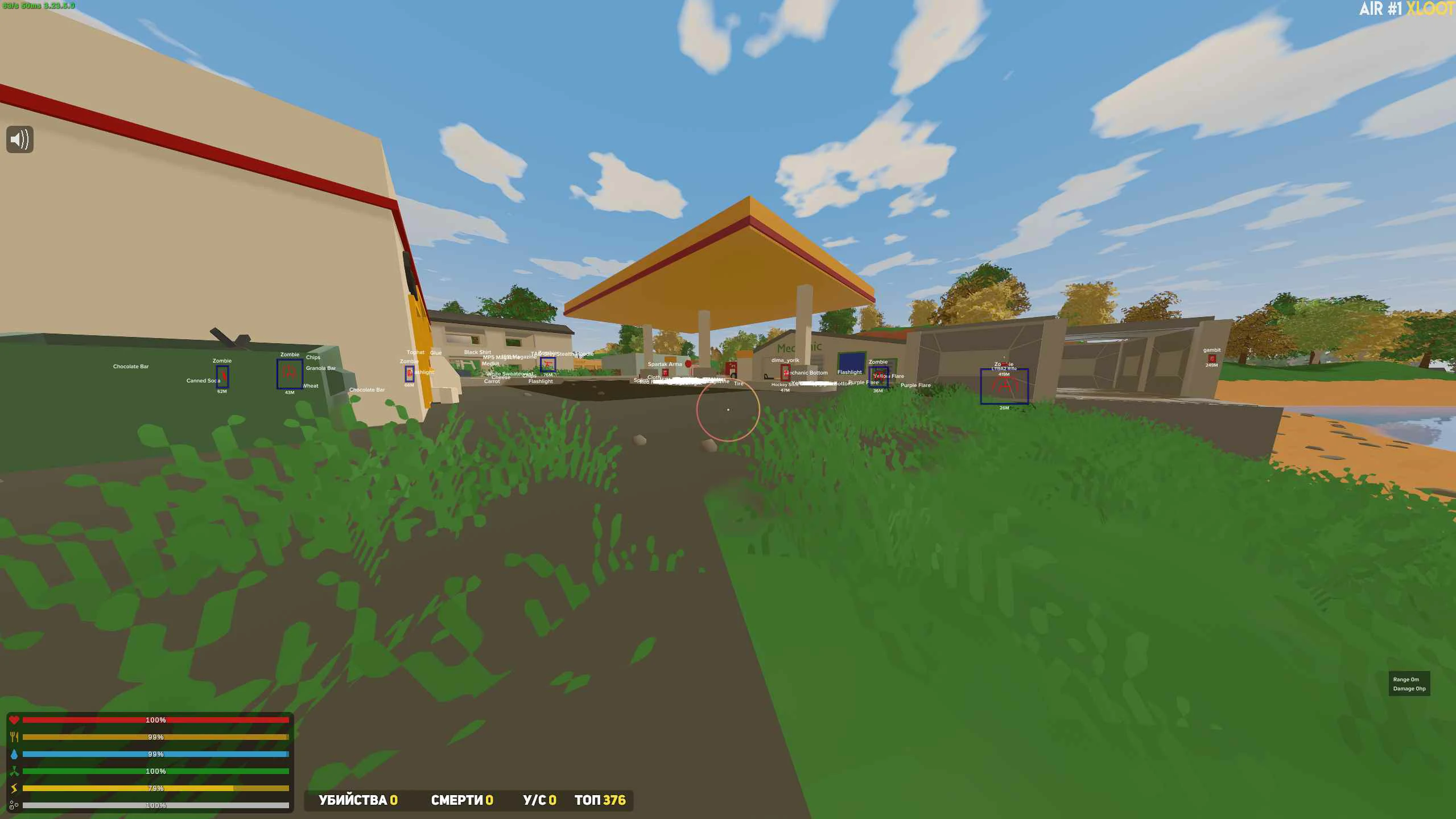
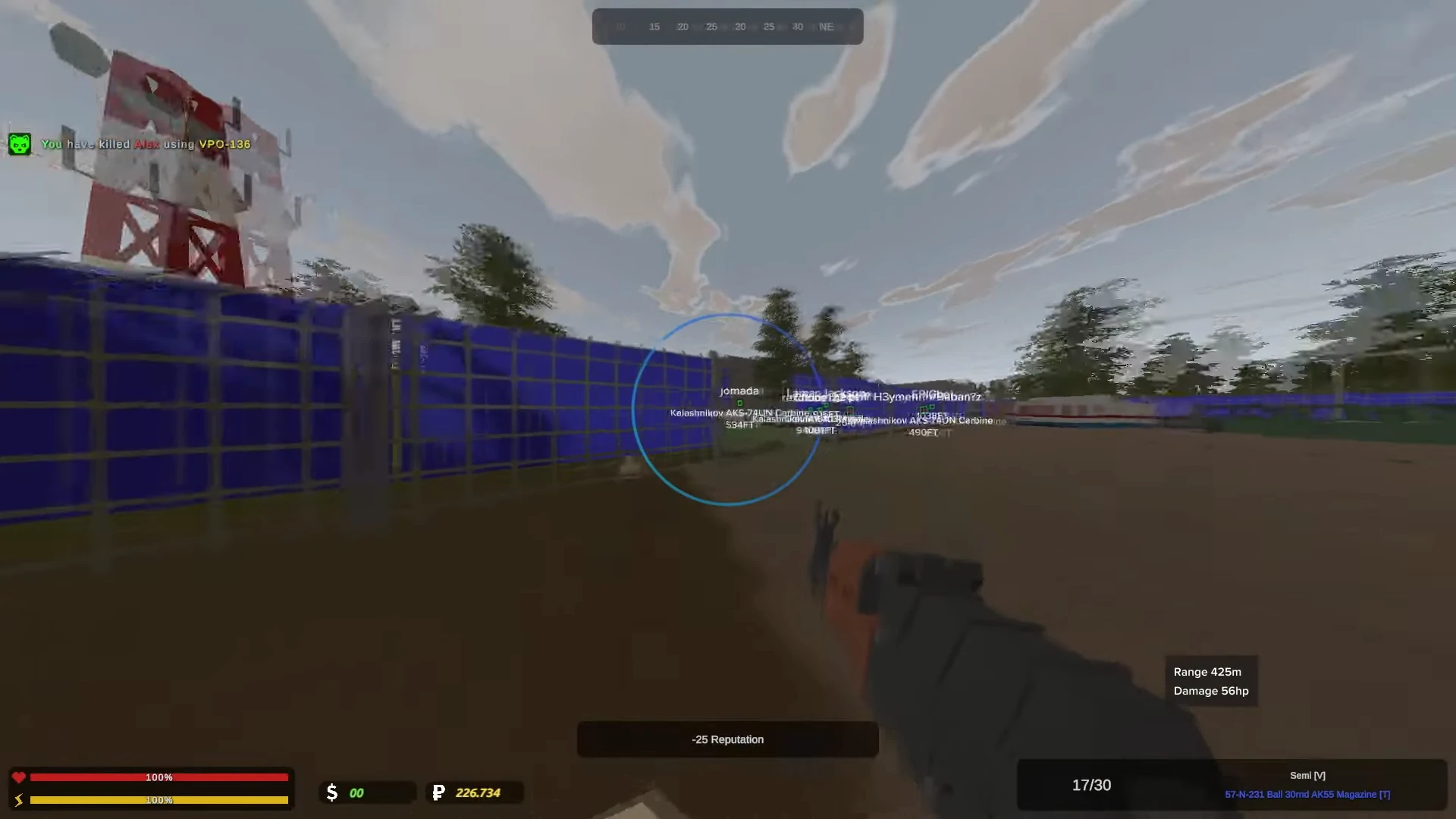
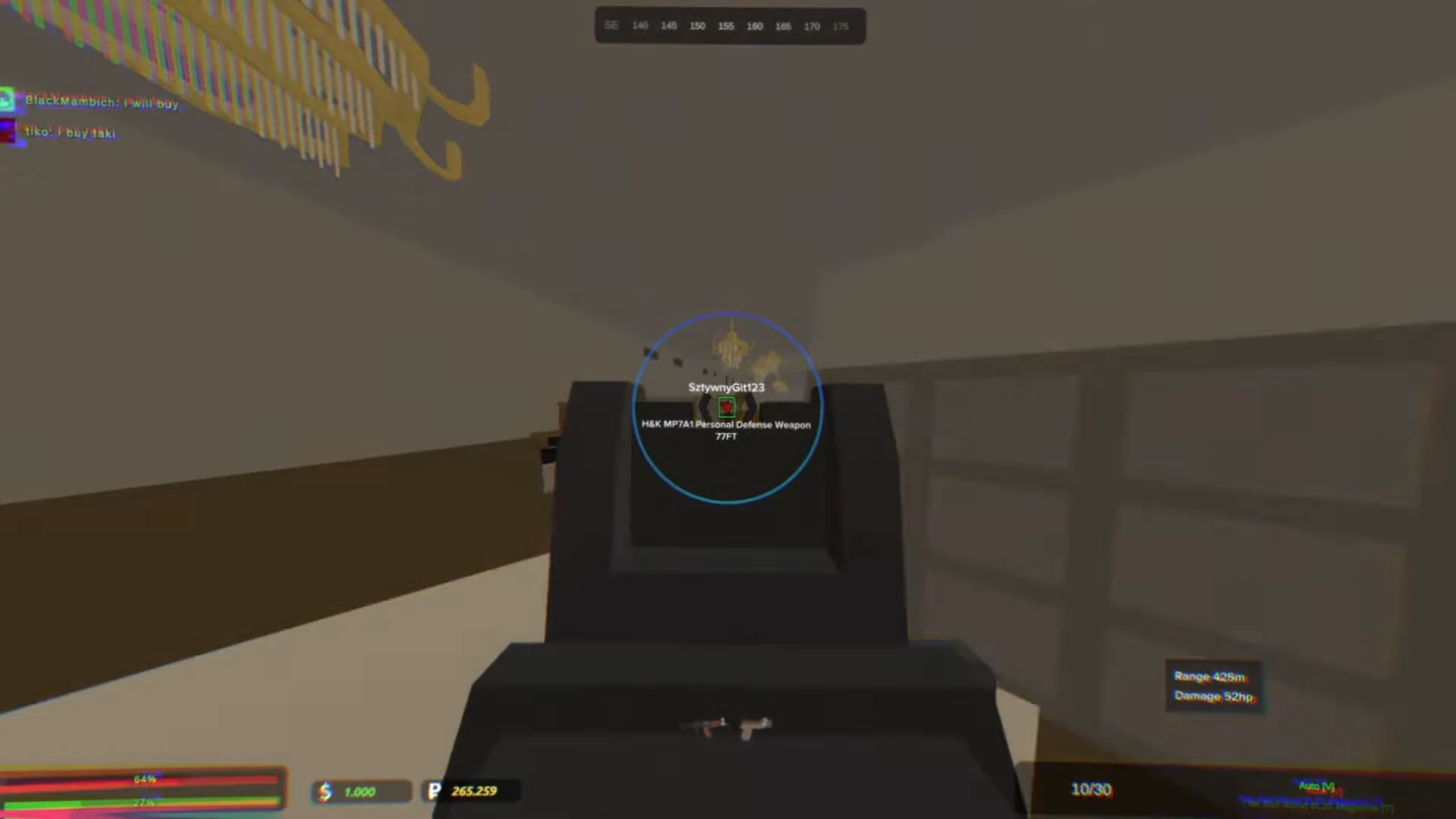
Unturned ESP overlays player positions, item locations, vehicles, and zombie types through walls and terrain across every map from PEI to Russia. Entity filters separate Military-tier weapons from Civilian junk, highlight Mega Zombies before they aggro, and flag player-built sentries and claim flags — turning blind scavenging into targeted loot runs with full server awareness.
Washington's Scorpion-7 lab has 40-plus rooms spread across multiple floors, half of them empty and the other half split between Civilian backpacks you don't need and the occasional Maplestrike spawn that makes the whole run worth it. Without item ESP, you clear room by room, checking every shelf, burning through immunity in the deadzone radiation while hoping the Ranger loot spawned on the floor you're currently not on. With entity filters set to Military-tier only, you see exactly which three rooms have what you came for and skip the rest — a 20-minute run compressed to four minutes with your immunity bar barely touched.
Entity Filter Configuration — Civilian, Ranger, and Military Tiers
Unturned's loot spawns in three tiers that correspond to map zones: Civilian (towns, farms — Cobra pistol, Chef hat, Canned Beans), Ranger (fire stations, ranger camps — Hawkhound, Swissgewehr, Ranger magazines), and Military (bases, airfields, deadzones — Maplestrike, Timberwolf, Alice Pack, Military Drum). Entity filters let you suppress lower tiers entirely so your overlay only renders the gear worth picking up. On a dense map like Elver with 600-plus item spawns, filtering to Ranger-and-above cuts visual clutter by roughly 70%.
Trap ESP and Sentry ESP are categories that SCUM's inventory-heavy survival loop doesn't need but Unturned absolutely does — other players bury Caltrops in grass, hide Claymores behind doors, and stack automated Sentry turrets covering base entrances. Seeing those before you walk into them is the difference between keeping your Alice Pack and respawning naked on the beach.
Unturned ESP Stream Proof — Overlay Visibility Control
Unturned ESP stream proof renders the full overlay — player boxes, item highlights, zombie markers, distance numbers — on a layer invisible to OBS, Streamlabs, and Discord screen share. The overlay stays fully visible on your monitor while broadcast software captures only the vanilla game feed. Unturned's Roleplay server scene is massive, and RP communities ban players for any visible overlay faster than BattlEye bans for memory injection.
How BattlEye Actually Scans a Unity Game Built by One Developer
BattlEye runs a kernel-mode driver called BEDaisy.sys that scans process memory, blocks DLL injection, and monitors aim velocity patterns every time Unturned launches on a BattlEye-secured server. As the first Unity/C# game to integrate BattlEye, Unturned's anti-cheat layer operates differently from BattlEye in Unreal Engine titles — the managed C# runtime creates memory structures that BattlEye had to build custom scanning rules to handle.
When BattlEye first deployed on Unturned servers, it permanently banned approximately 3,700 confirmed cheaters within the first week. That wave cleared servers for about a month before new tools adapted. The cycle has repeated with every major BattlEye signature update since — ban wave, brief clean period, adaptation, repeat. What changed in the latest game update is the HWID spoofer detection: instead of silently shadowbanning flagged hardware, the game now disconnects you with an explicit message confirming your hardware fingerprint was matched to a ban record.
BattlEye's Three Detection Layers in Unturned
BEDaisy.sys runs three concurrent detection methods. Signature scanning matches known cheat binaries against a database that BattlEye updates server-side without requiring a game patch — your tool can be undetected today and flagged tomorrow without Nelson pushing a single line of code. Behavioral heuristics analyze aim velocity curves, checking whether mouse movement patterns fall within human-achievable acceleration ranges. Memory pattern detection scans the C# managed heap for injected objects that shouldn't exist in a vanilla Unity runtime.
VAC runs alongside BattlEye as a secondary layer on VAC-secured servers, but community consensus is clear: VAC catches outdated public cheats and little else. The real protection is Escape from Tarkov's BattlEye kernel architecture running the same BEDaisy driver with Unturned-specific scanning rules. Native server-side validation adds a third check — hit registration verification, line-of-sight validation, and the new HWID spoofer detection that outputs an explicit disconnect message.
Why a BattlEye Ban in Unturned Kills Your Tarkov and DayZ Access Too
BattlEye HWID bans are global. A hardware ban triggered in Unturned — a free game — blocks your system's fingerprint from joining BattlEye-secured servers in every title using the service: Escape from Tarkov, DayZ, Rainbow Six Siege, Squad, Arma Reforger, SCUM, Hell Let Loose, and every future game that integrates BattlEye. Your motherboard ID, MAC address, and drive serial numbers are all part of the fingerprint. Swapping your Steam account doesn't help when the ban is tied to your hardware, not your profile.
That cross-game exposure is why HWID spoofing isn't optional for Unturned — it's the single most important safety layer for anyone who plays other BattlEye titles on the same machine.
Unturned Wallhack — Reading Base Layouts Before the First Charge Is Placed
Unturned wallhack renders player models, storage containers, and structural components through walls and terrain on every map and server type. In a game where base raiding requires Rocket Launcher ammo and C4 charges that cost hours of deadzone farming to acquire, seeing the exact placement of lockers, sentries, and claim flags through Brick walls turns a blind siege into a surgical operation.
A fortified Brick base near the Liberator on Russia has three airlocks, roof-mounted Sentry turrets covering every approach, and a loot room that could be behind any of six walls. Each Rocket Launcher round is irreplaceable until you farm another deadzone run — there's no ammo shop, no crafting recipe, no shortcut. Wasting four charges on an empty room because you guessed wrong means restarting hours of loot progression. Wallhack shows the claim flag sitting behind the second-floor east wall, the three lockers stacked in the northeast corner, and the two Sentries covering the south-facing door. One charge, right wall, clean entry.
Wallhack for Base Scouting and Raid Planning
Brick is the strongest building material in Unturned, absorbing more explosive damage per wall segment than Metal or Wood. A full Brick base with proper airlock design takes 8-plus charges to breach through the front entrance — but most builders hide their loot room behind a single interior wall that only takes one charge once you're inside. Wallhack collapses the entire scouting phase. Instead of spending 20 minutes circling a base looking for weak points, you walk up, identify the loot room, count the Sentries, and plan your entry in under a minute.
Claim flags have a specific placement radius that experienced builders exploit — putting the flag at floor level between two foundations so it's protected by structural geometry. Wallhack shows the exact flag position regardless of where it's hidden, which matters because destroying the claim flag removes structure protection and opens every wall to melee damage. Skipping the flag and going straight to explosives is how freshie raiders waste their only Rocket Launcher round.
Stream Proof Wallhack for Raid Broadcasting
Raid streams are popular in Unturned's content creator community — viewers want to see the breach, the loot grab, the escape under fire. Stream proof wallhack keeps structural rendering invisible to capture software while you plan the breach on your monitor. Your viewers see raw gameplay; you see every wall, door, and locker in the target base. OBS, Streamlabs, and Discord screen share all capture the vanilla game layer exclusively.
Why the Free-to-Play Ban Cycle Makes Detection Windows Everything
Unturned is free. Creating a new Steam account takes 90 seconds. A BattlEye game ban means nothing if the only cost of getting caught is clicking "Create Account" and downloading the game again — unless the ban reaches past the account and into the hardware.
That's the equation that defines Unturned's entire cheat ecosystem, and it's different from every paid game on the market. In a $60 title like Tarkov, a ban costs $60 plus all progression. In Unturned, a standard ban costs nothing. BattlEye's HWID banning and the latest game update's spoofer detection are the only mechanisms that create real friction. Without hardware-level enforcement, the ban-and-reroll cycle takes less time than loading the map.
HWID Bans — The Only Friction That Matters in a Free Game
BattlEye HWID bans fingerprint your motherboard ID, network MAC address, and storage drive serial numbers. A standard game ban locks one Steam account. An HWID ban locks your physical machine from joining any BattlEye-secured server across every game using the service — Unturned, DayZ, Tarkov, Rainbow Six Siege, Squad, Arma Reforger, SCUM, and Hell Let Loose. Buying a new copy doesn't apply because Unturned is free. Buying a new Steam account doesn't help because the ban isn't tied to your profile.
The latest Unturned update escalated enforcement further. Previous builds silently shadowbanned flagged hardware — the player could still connect but would see degraded server responses and stealth matchmaking restrictions. The current build disconnects with an explicit message confirming hardware ID detection. That transparency shift means players know immediately when their spoofer fails, rather than playing for hours on a shadowbanned session wondering why hit registration feels wrong.
For anyone who also plays Roblox and other free-to-play titles, the pattern is familiar: free games require HWID-level protection because account-level bans have zero economic friction. The spoofer isn't an add-on feature — it's the foundation.
Update Cadence and Detection Windows
BattlEye updates its signature database server-side without requiring a game patch from Nelson. That means a tool that's undetected at 3 PM can be detected at 4 PM with no visible change on the game's end — the kernel driver pulled new signatures from BattlEye's backend and started scanning for patterns it wasn't looking for an hour ago. Detection windows between BattlEye signature pushes are the only metric that matters for sustained access.
BurgerCheats pushes updates within hours of BattlEye signature changes and Unturned game patches. The Discord community (4,910-plus members) gets real-time status notifications when a detection window opens or closes. The current detection status for BattlEye-protected titles is tracked on the status page with timestamps.
Unturned No Recoil — Maplestrike Full-Auto Without the Spray Pattern
Unturned no recoil eliminates weapon kick on full-auto fire with an adjustable intensity slider from zero to full compensation. The Maplestrike's vertical climb pattern and the Zubeknakov's horizontal drift both flatten to laser accuracy, turning close-range spray fights in Washington's urban buildings into one-sided exchanges where every round connects center mass.
Two players face each other inside a Charlottetown building on PEI, both holding Maplestrikes with Military Drums. Player A fires 20 rounds — the first five hit chest level, rounds six through ten climb above the head, and the remaining ten hit ceiling tiles. Player B runs no recoil at 80% intensity — every round stays chest-level, fight over in under a second. The Maplestrike does 20 damage per body shot. At 80% intensity, the spray looks natural enough that killcam replay shows controlled bursts rather than robotic precision.
Per-Weapon Intensity Tuning
Different weapons in Unturned have distinct recoil signatures. The Maplestrike pulls vertically with mild horizontal wobble. The Zubeknakov drifts right with sharper vertical spikes. The Dragonfang LMG has sustained climb that accumulates over long bursts because it's designed for suppression, not precision. Setting no recoil to a flat 100% across all weapons looks suspicious on the Dragonfang — a weapon that nobody controls perfectly in vanilla play. Per-weapon tuning lets you match expected recoil behavior: 80% on the Maplestrike (close to controllable), 60% on the Dragonfang (removes the worst climb while keeping some movement), and 90% on the Zubeknakov (its horizontal drift is the hardest to control manually, so higher compensation looks less conspicuous).
No Recoil and BattlEye Detection Thresholds
BattlEye's behavioral heuristics include recoil pattern analysis — comparing your mouse movement data against expected weapon kick values. Full 100% recoil compensation on every weapon for every engagement creates a statistical anomaly: zero vertical displacement across hundreds of consecutive spray transfers. At 60–80%, the compensation leaves enough residual movement that your input data falls within the range of a player with strong spray control. The intensity slider isn't a convenience feature — it's a detection calibration tool.
Unturned Hacks — Solo vs Squad Configuration Guide
Configuring Unturned hacks differently for solo PvE survival and squad PvP raiding changes which features carry the session. Solo players farming deadzones on Arid need item ESP at maximum render distance and zombie ESP highlighting Mega Zombies before they aggro, while squad players raiding Brick bases on Russia prioritize player ESP, tight-FOV aimbot for Maplestrike duels, and wallhack for coordinated charge placement.
The table below breaks down feature settings for each playstyle. These aren't suggestions — they're the configurations that match how Unturned actually plays in each context. A solo deadzone run and a four-man base raid are fundamentally different games happening inside the same map.
Feature Setting Solo PvE Configuration Squad PvP Configuration Why Different Aimbot FOV Wide (120°) — covers Mega Zombie aggro range in deadzone corridors where Sprinters flank from side passages Tight (30–45°) — precision Maplestrike duels at mid-range, avoids snapping to squad teammates PvE threats surround you in deadzones; PvP fights are directional and need discretion Aim Bone Head — maximize DPS against Mega Zombies (12 Timberwolf headshots vs 30+ body shots) Chest — larger hitbox during chaotic spray fights where players strafe and bunny-hop Mega Zombies are large stationary targets; players are small and move unpredictably ESP Entity Filter Items ON (Military-tier only), Zombies ON (Mega + Flanker highlighted), Players low priority Players ON (max distance, health bars, name tags), Items OFF, Zombies OFF Solo PvE needs loot detection and threat avoidance; squad PvP needs enemy positions for coordinated pushes ESP Render Distance Maximum — see Military loot spawns across entire deadzone floors on Arid and Russia Medium (200–300m) — beyond this range, player info becomes visual clutter during base raids Deadzone loot is spread across large areas; raid targets are within engagement range No Recoil Intensity 100% — zombies don't watch killcams, maximize kill speed with Maplestrike full-auto 60–80% — partial compensation looks natural in spectator mode on admin-monitored servers PvE has no spectators; PvP servers may have admins reviewing suspicious spray patterns Wallhack OFF — limited value against zombies since ESP already covers threat detection ON — critical for reading base interiors, locating claim flags and loot rooms before placing charges PvE doesn't involve base penetration; PvP raiding is wallhack's primary purpose HWID Spoofer Recommended — BattlEye HWID bans are cross-game and permanent even on PvE servers Required — active PvP on populated servers generates the highest report volume and admin scrutiny Both need it, but PvP exposure to player reports makes it non-negotiable The distinction matters most on maps with both PvE and PvP content running simultaneously. Russia's deadzone contains some of the best loot spawns in the game, but the military base above it is a KOS hotspot. Switching from PvE config (wide FOV, item ESP, zombie ESP) to PvP config (tight FOV, player ESP, wallhack) mid-session when you hear gunfire above the deadzone entrance is the difference between walking out with a Maplestrike and donating your Alice Pack to someone with better settings.
Unturned Cheats — Getting Started Without Getting Banned on Day One
Setting up Unturned cheats on a BattlEye-secured server starts with verifying HWID spoofer status before the game launches, confirming the latest BattlEye signature database has been addressed, and starting with conservative aimbot FOV and ESP render distances to avoid behavioral flags during the first session.
Unturned External Cheat — HWID Spoofer Verification Before Launch
The HWID spoofer must initialize before BattlEye's kernel driver loads. BEDaisy.sys fingerprints your hardware during the game's boot sequence — if the spoofer activates after BEDaisy reads your real hardware IDs, the spoofer is protecting nothing. Verification confirms that the spoofed fingerprint is active, that your real motherboard ID and MAC address are masked, and that the hardware profile presented to BattlEye doesn't match any existing ban records across the entire BattlEye network.
Getting this wrong has cascading consequences. A BattlEye HWID ban triggered on Unturned — a free game you downloaded on a whim — bans your hardware from Rainbow Six Siege and every other BattlEye game on your machine. That's potentially hundreds of dollars in game libraries locked behind a hardware swap, all because the spoofer didn't load before the kernel driver.
First-Session Settings — Start Conservative
Day one on a new server is not the time to run aimbot at 180° FOV with instant snap and full ESP rendering every item on the map. Start with aimbot FOV at 30° (tight enough to only lock onto targets you're already aiming near), ESP render distance at 150m (enough for situational awareness without painting every player on the server), and no recoil at 50% (noticeable improvement in spray control without zero-deviation patterns). Increase settings gradually across sessions as you confirm stability.
Avoid speed hacks, fly hacks, and item spawners entirely on BattlEye servers. These modify server-side movement data and inventory states that the game's native validation checks flag immediately — BattlEye doesn't even need to catch them because the server rejects the invalid data and flags the account. Stick to client-side features: aimbot, ESP, wallhack, no recoil, and HWID spoofer.
Questions about BattlEye compatibility or configuration? The BurgerCheats Discord (4,910-plus members) has 24/7 support channels, and the full Unturned feature breakdown and compatibility status covers every setting discussed in this guide.
Unturned Hacks — Frequently Asked Questions
Can I get banned in Escape from Tarkov or DayZ for using hacks in Unturned?
Yes — BattlEye HWID bans are global across every game using the BattlEye service, so a hardware ban triggered in Unturned blocks your system from joining BattlEye-secured servers in all other BattlEye titles until the hardware fingerprint is changed. This includes Escape from Tarkov, DayZ, Rainbow Six Siege, Squad, Arma Reforger, SCUM, and Hell Let Loose. Using an HWID spoofer prevents the real hardware fingerprint from being associated with any ban, keeping all BattlEye titles accessible regardless of what happens on any single game.
Does Unturned's item ESP show the difference between Civilian, Ranger, and Military loot?
Entity filters separate Unturned's three loot tiers — Civilian items like Cobras and civilian clothing can be hidden entirely, letting you focus ESP rendering on Ranger-tier drops (Hawkhound, Swissgewehr) and Military-tier gear (Maplestrike, Timberwolf, Alice Pack) so your overlay stays clean in loot-dense areas like Scorpion-7 on Washington or the military base on PEI. Filtering to Military-only on dense curated maps like Elver cuts overlay clutter by roughly 70%.
Will BattlEye detect hacks on Unturned servers that have BattlEye disabled?
On servers with BattlEye disabled, the kernel-level driver does not load and cannot detect client-side modifications. However, VAC still runs on VAC-secured servers, and the game's native server-side validation checks (hit registration verification, line-of-sight checks, HWID spoofer detection) remain active regardless of BattlEye status. Virtually no populated public Unturned server disables BattlEye — the servers worth playing on all run it.
Does the aimbot work against Mega Zombies and boss variants on deadzone maps?
The aimbot locks onto all zombie types including standard Walkers, Sprinters, invisible Flankers, and Mega Zombies — plus boss variants like Electric, Wind, and Fire Mega Zombies that appear in deadzone locations on Arid, Russia, and Washington. Bone selection set to skull prioritizes headshots that minimize the 30-40-plus rounds typically needed to down a Mega on normal difficulty. On Arid's multi-tier deadzone system, where boss variants guard the highest-tier loot behind escalating radiation, bone-locked headshots cut ammo consumption by more than half.
Can other players see my ESP overlay if I'm streaming on a Roleplay server?
Stream proof mode renders the ESP overlay on a separate layer that screen capture software cannot detect. OBS, Streamlabs, and Discord screen share all capture the vanilla game feed while the full overlay — player boxes, item highlights, zombie markers, distance numbers — remains visible only on your monitor. Unturned's RP server communities enforce strict rules against any visible overlay or modified client, and stream proof keeps your broadcast clean.
Does the HWID spoofer protect against the new disconnect message added in the latest Unturned update?
The spoofer generates a clean hardware fingerprint before both BattlEye and the game's native HWID check initialize, preventing the kernel scan and the Unturned-specific spoofer detection routine from matching your real hardware identifiers to any existing ban records. The explicit disconnect message ("Hardware ID (HWID) spoofer detected") only triggers when the game's native check identifies a known spoofing method — BurgerCheats' spoofer operates below the detection layer that the latest update targets.
-
-
Total Members 5,755
-
Most Online 149
-
Newest Member ejder0234

-
-
Reviews
-

By nineyt. · Posted
I've had a great experience not only with jjboy, but burger themselves. They have great staff that get back to you on time, and solve pretty much any issue you end up running into. -

By 10_jacob_01 · Posted
Howdy! I've been purchasing products from Burger cheats since 2025 and they've had the best ranges of selection for multiple products! Next cheat full and Lite (EFT) - major fan! honestly one of the best I've used and it has the features for pvp and pve, some tailored for those pve mains like myself, customizable UI, very modular and super user friendly, absolutely would recommend it to others! Collapse (EFT) - Great all around and it's nice and very straight forward, I do enjoy the UI of this one Ancient (EFT) - A good beginner one for people just getting into EFT cheesing. and lastly Vortex (War Thunder) - This has been my go too every time I want to just go ham in war thunder, I absolutely love it! Overall with burgercheats they've provided such clear fool proof instructions I simply cannot thank them enough, as they were my first service provider and will always be my go to service provider via myself or recommending to others! - A very happy Customer!! -

By sieto215 · Posted
I’ve had a really good experience with the service so far. The website is easy to use, everything is well organized, and the AI assistant is surprisingly helpful and actually gives useful answers. What impressed me most was the support. Whenever I had a question or needed help, I got a proper response instead of just a generic answer. The support was friendly, helpful, and really tried to solve the issue. Overall, I’m very satisfied with the website, the tools, the AI assistant, and especially the customer support. Definitely a very positive experience and something I would recommend. -

By EnteMitTalente · Posted
great product, paypal purchase went flawless with fast response and @admin helped me solve my tech issues -

By _swappy · Posted
I have gotten one of the best marketplace experience here. I personally have bought apex legends cheat here several times already and have recommended a few of my friends as well. In my personal opinion it is the best marketplace in this domain as of right now.
-